
Sidebar
Table of Contents
Important
Please don't waste resources.
Printer Pool
The printer pool is an area in the middle of the second floor of the ICT-Building. This page explains how to use the printers there.
| Type | Network Address | Name | JetType Black | JetType Yellow | JetType Magenta | JetType Cyan | Windows Driver |
|---|---|---|---|---|---|---|---|
| HP Monochrome | pr216-c703.uibk.ac.at | HP LaserJet M605dn | CF281X | N/A | N/A | N/A | |
| Canon Color | pr210-c703.uibk.ac.at | Canon imageRUNNER ADVANCE DX C5840i | C-EXV 58BK | C-EXV 58Y | C-EXV 58M | C-EXV 58C | |
| HP Color | pr218-c703.uibk.ac.at | HP Color LaserJet CP3525x | S90008JET | S90010JET | S90011JET | S90012JET | download |
The printers are only reachable via the IFI network, if you use WiFi please authenticate at https://fwauth-tech.uibk.ac.at/ and keep the tab open!
You will need a c-number for the Institute (c703….) to be able to print (not a cs-number)!
Paper Types
We currently have multiple types of paper at the Institute / IFI-Printer Pool.
| Name | Characteristic | Weight | Type | Canon Setting | Package Color | Link |
|---|---|---|---|---|---|---|
| Mondi Nautilus Classic | Grainy Texture | 80 g/m2 | A4 | Plain 2 (76-90 g/m2) | GREEN | https://mymondi.net/ufp/en/brand/nautilusclassic |
| Mondi BIO TOP 3 extra | Yellowish Color | ORANGE | https://mymondi.net/ufp/en/brand/biotop3extra | |||
| Mondi IQ Economy+ | - | RED | https://mymondi.net/ufp/en/brand/iqeconomy+ | |||
| Mondi IQ Economy | - | A3 | TBD | |||
| TBD | Blank Packaging | - | TBD |
Please pay attention to which paper is currently in the printer to avoid mixing up different paper types. The differences are subtle but noticeable when directly compared.
HP LaserJet Enterprise M605dn
The printer is only reachable via the IFI network, if you use WiFi please authenticate at https://fwauth-tech.uibk.ac.at/ and keep the tab open!
This is the default printer for fast monochrome text output. If you need advanced functionality like color printing or stapling you can install the Canon C5550i by following the steps further down on this page.
Install on GNU/Linux
Make sure you have hplip 3.15.4 or higher installed.
http://localhost:631/admin(user and password is the same you use on your local machine)- Add Printer
- AppSocket/HP JetDirect
- Connection:
socket://pr216-c703.uibk.ac.at - add Name and Description:
- Name:
[IFI_BW]_HP_LaserJet_M605dn_(PS) - Description:
[IFI BW] HP LaserJet M605dn (PS) - Location:
IFI Printer Pool - Make: select 'HP'
- Model: select
HP Laserjet M604 M605 M606 Postscript (recommended)orHP LaserJet Series PCL 6 CUPS (en) - select 'Add printer'
- Options Installed: Duplex Unit: On or Duplexer: installed
- General: Two-Sided: Long-Edge Binding
- Paper/Quality: EconoMode: On
- Finally, select 'Set Default Options'
Install on Windows 10 / 11
Get the Basic Driver V4 from the manufacturer website. Open the downloaded exe file to extract the driver to C:\HP_LaserJet_Enterprise_M605.
Install it via Devices and Printers as a local printer over TCP/IP, using the printer's hostname pr216-c703.uibk.ac.at.
Navigate to the extracted driver location and select hpev3f2a4_x64.inf.
If you have trouble please contact your system administrator.
Canon imageRUNNER ADVANCE DX C5840i
To use the Canon Printer you will need a group based ID and PIN (get these from your SysAdmin).
The printer is only reachable via the IFI network, if you use WiFi please authenticate at https://fwauth-tech.uibk.ac.at/ and keep the tab open!
If you struggle with the configuration you may also just send your document to the printer using the Web Interface.
Install on GNU/Linux x64 (except Ubuntu or Mint!)
- Download and extract the PPD file
- Visit
http://localhost:631/admin(user and password is the same you use on your local machine) - Select: Add Printer
- Choose Option: Internet Printing Protocol (https)
- Connection: https://pr210-c703.uibk.ac.at/ipp/print
- add Name and Description:
- Canon_iR-ADV_C5550i
- [IFI Color] Canon iR-ADV C5550i
- IFI Printer Pool
- Browse and select the previously downloaded and extracted ppd file
- Select: Add printer
Options Installed- Paper Deck Unit: On;Paper Source Options: High Capacity Cassette Feeding Unit A1; Output Options: Inner Finisher H1General- Colour Mode: Colour / Greyscale (depending on which ID you got), Media Size: A4Canon Device Specific- User Password: Custom, User ID: Custom (enter the numeric ID and PIN you got previously from the administrative staff)Paper- Paper Type: Plain 2 (76 to 90g/m²)Finishing- Duplex: Long edge- Finally select 'Set Default Options'
or alternatively over a shell terminal:
sudo lpadmin -p c5550i -E -v "https://pr210-c703.uibk.ac.at/ipp/print" -i /path/to/canon-iradvc5550i.ppd
sudo systemctl restart cups
If printer is aborting check error in /var/log/cups/ you may need sicgsfilter executable found here http://linuxsoft.cern.ch/cern/updates/slc6X/i386/SRPMS/repoview/sicgsfilter.html
Extract the files, change the name from sicgsfilter.64 to sicgsfilter and copy to /usr/bin/
Install on Ubuntu (x64) or Linux Mint
- Download the Printer PPD file archive and extract the ZIP archive.
- Open a web browser and visit http://localhost:631/admin (use your local machine's username and password if prompted).
- Click on Add Printer.
- Choose the option: Internet Printing Protocol (https).
- Enter the connection URL:
https://pr210-c703.uibk.ac.at/ipp/print - Fill in the printer details:
- Name:
Canon_iR-ADV_C5840 - Description:
[IFI Color] Canon iR-ADV C5840 - Location:
IFI Printer Pool
- Select Provide a PPD File, click on Browse…, and select the extracted PPD file.
- Click Add Printer.
Configuration & Default Options
After adding the printer, select the newly created printer, navigate to the Administration dropdown menu, and choose Set Default Options. Configure the following tabs:
Options Installed
- Paper Deck Unit:
On - Paper Source Options:
High Capacity Cassette Feeding Unit C1 - Output Options:
Staple Finisher AB1 - Copy Tray:
On

General
- Color Mode:
Color/Black and White / Grayscale(depending on your assigned permissions) - Media Size:
A4
Canon Device Specific
- User Password:
Custom - User ID:
Custom(enter the numeric Department ID and PIN you received from the administrative staff)
Paper / Finishing
- Paper Type:
Plain 2 (76 to 90g/m²) - Duplex:
2-Sided Printing / Long Edge
Finally, click on Set Default Options at the bottom of the page to save the configuration.
Optional Features
When sending a print job via the system print dialogue, you can dynamically adjust the following settings in the printer options:
- Staple: Check
StapleorEco (Staple-Free)and select your preferred staple position.

Install on Windows 11 / 10 (/ 8.1 / 8 / 7) (x64)
For Windows 7, prior to installing the printer driver, you need to apply a hotfix which enables TLS1.2 (/TLS1.1) as default secure protocol. Please get and install the hotfix from HERE - information why this hotfix is needed is explained here.
- Download and extract the Windows x64 Driver
- Press
 , type
 control printersand run it (or execute the commandcontrol printersin a CMD window) - Click on Add a printer
- [Win 7 only: Select “Add a network, wireless or Bluetooth printer”]
- Click on “The printer that I want isn't listed”
- Choose “Select a shared printer by name” and enter https://pr210-c703.uibk.ac.at/ipp/print, then click “Next”
- In the next window, select “Have Disk”, navigate to the folder where you extracted the driver before and open the .inf file, then select OK.
- In the printer list, select Canon iR-ADV C5550/C5560 PCL6 and press “Next”.
Enter as printer name [IFI Color] Canon iR-ADV C5550i PCL6.- Finish the installation (don't print a test page yet).
- Return to the “Devices and Printers” window (
control printers) - Select the freshly added canon printer, right click, “Printer properties” navigate to tab “Device Settings” - change options:
- “Paper Source Options”: High Capacity Cassette Feeding Unit-A1
- directly below, check the option Paper Deck Unit
- “Output Options”: Inner Finisher-H1
- “User Management(J)”: Select Department ID Management in the list and click “Settings” aside

- a new window pops up, tick the option Allow PIN Settings and enter the numeric ID and PIN you got previously from the adminstrative staff;
uncheck option “Confirm Department ID/PIN When Printing” and check option Authenticate Department ID/PIN at Device 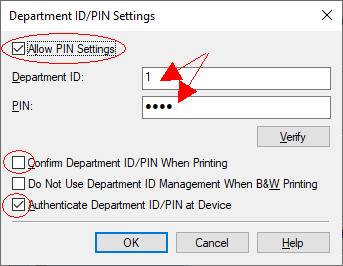
- Finally click OK on all remaining printer windows.


Install on Mac OS X
- Go to this page
- Download the appropriate driver for your Mac OSX version
- Mount the *.dmg file you've downloaded via double-click and install the *.package to install the driver software
- Add a printer via the “+” symbol in your “Printer & Scanners” settings
- Choose IP at the top
- Choose Airprint as Protocol
- Enter pr210-c703.uibk.ac.at as Address
- Name the printer
- Name: Canon iR-ADV c5550i
- Location: IFI Printerpool
- Choose “Select Software” in the field “Use” and search for “Canon iR-ADV C5550/C5560”
- By clicking “Add” the printer will be installed
- To further configure the printer click on Options & Supplies
- In the Options tab select the following options
- “Paper Source Options”: High Capacity Cassette Feeding Unit A1
- “Paper Deck Unit”: On
- “Output Options”: Inner Finisher H1
- Tick the “Department ID Management” Box

- Next switch to the Utility tab and select Open Printer Utility
- “User Management” select Department ID Management
- In the field below enter the ID and PIN you previously got from the Administrative Staff
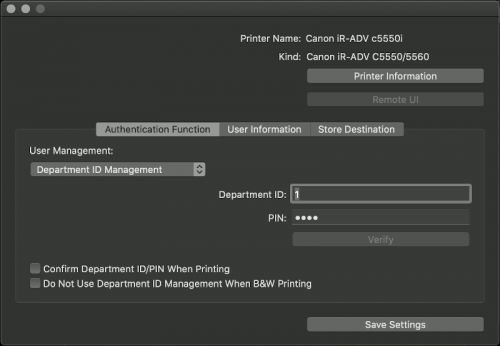
- Finally click Save Settings


Archive
Mircea got it running with CQue Linux Driver, install the printer (pr209-c703.uibk.ac.at - select ps queue) and modify the file /etc/cups/ppd/Canon-iR-ADV-C5030-5035.ppd adding DefaultUserID and DefaultUserPassword (restart service cups/reboot) on Fedora 24 and Ubuntu 17.01.
Toner Locations
Please refer to the following list for the locations of the different Toners
Last modified: 2026/06/17 09:00 by Simon Ausserlechner